
Watch live power
Review kW and electrical values as operating conditions change. Check whether a demand increase coincides with production startup, compressors, HVAC or another metered load.
MeterSight solutions
See when electrical demand climbs and which metered loads are running at the same time. MeterSight Silver and Gold bring live power, 15-minute demand and recorded trends into one monitoring workflow.
Energy in kilowatt-hours tells you how much electricity you used over a period. Demand in kilowatts describes the rate of use over a measurement interval. A facility can use similar monthly kWh in two months while reaching different demand peaks.
MeterSight pairs energy history with electrical trends so your team can investigate the operating conditions around a peak. Your utility tariff determines the demand interval and billing calculation that apply to your property.
Use measurements from the meters you connect. A main meter shows the site total; submeters make it easier to investigate a production line, tenant, panel or mechanical load.
Review kW and electrical values as operating conditions change. Check whether a demand increase coincides with production startup, compressors, HVAC or another metered load.
Look at power and demand around the period you are investigating. Compare operating schedules and identify which separately metered loads contributed at that time.
Use PDF reports and CSV exports to support an operations review. Silver and Gold add scheduled email delivery so the team receives regular reporting.
The Silver power-monitoring screen combines electrical readings with a continuous trend and demand summaries. Gold includes these monitoring tools and adds its alarm and analysis capabilities.
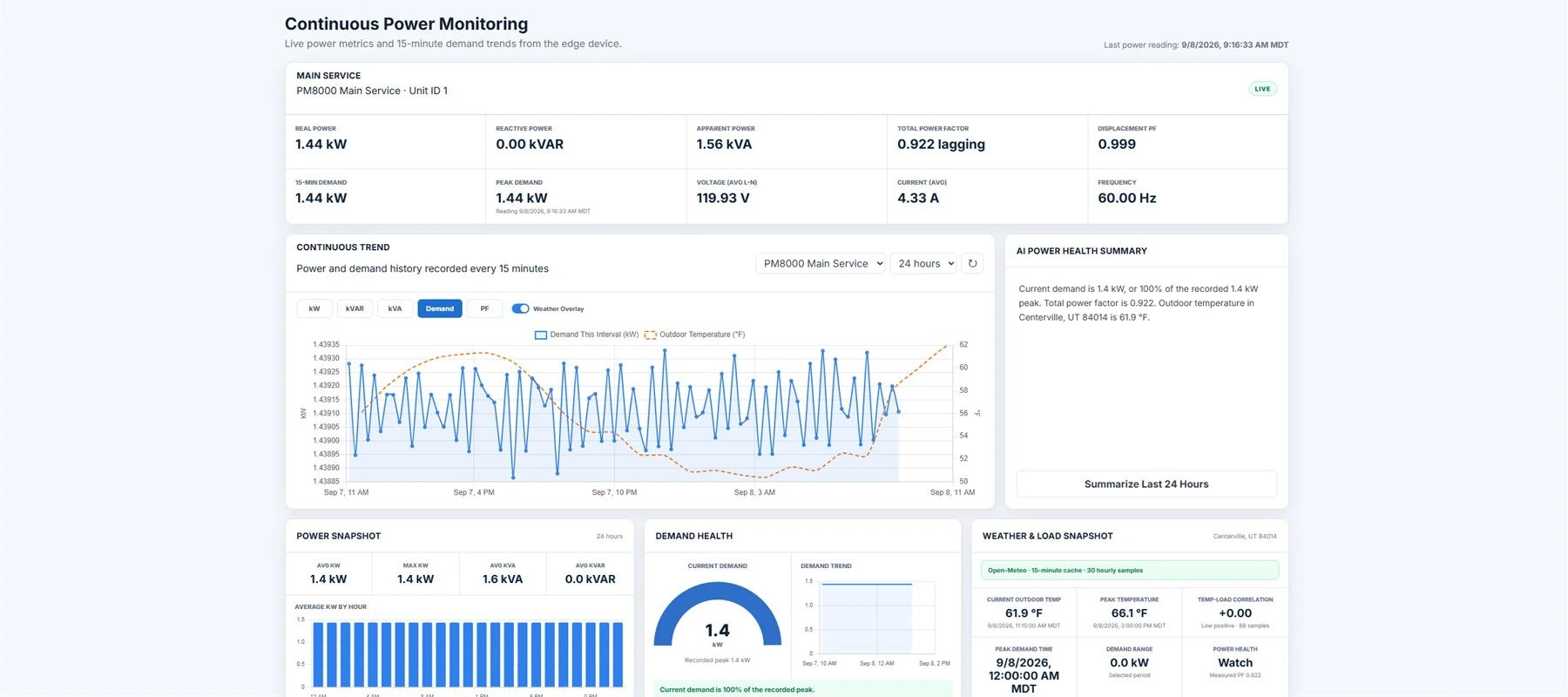
MeterSight connects to compatible Modbus TCP meters. Modbus RTU meters on RS-485 need a suitable TCP-to-RTU gateway. A preset or custom register map defines the values the software can read.
Send us the meter make, model, firmware and register documentation. We can review the demand and energy points available for your site before you install. Start with the meter compatibility table or the Modbus monitoring guide.
Choose Silver for live electrical values, 15-minute demand, recorded trends, harmonics and scheduled reports. It also includes Bronze energy accounting and tenant billing.
Choose Gold when the site also needs threshold alarms, escalation, live electrical graphics and deeper power-quality investigations. Review the available alarm measurements during commissioning.
Compare package capabilities. Both packages are available in the cloud or on premises for US facilities.
Turn metered tenant kWh and your blended rate into invoices and supporting usage reports.
Keep meter history on your Windows server, with local browser access and offline licensing options.
Tell us what you want to monitor and where the data should live. We will help you choose a package and plan a trial for your US facility.